![Lentune Logo_Brick_RGB.png]](https://www.lentune.com/hs-fs/hubfs/Lentune%20Logo_Brick_RGB.png?height=40&name=Lentune%20Logo_Brick_RGB.png)
Overview
Lentune is moving away from password use. Instead we are rolling out sign in with your email address, and we email you a six-digit code to enter. Once the code is accepted you are signed in, and you stay signed in for a good while afterwards, so most people only see a code occasionally. Removing passwords means there is nothing to remember, nothing to reset, and no password that could be guessed, reused or shared. Nothing else about Lentune changes: your web address, screens, permissions and data all stay exactly as they are. This article covers signing in, staying signed in, and what to do if your code does not arrive.
Sign In to Lentune
Signing in takes four steps. You will need to be able to open the inbox of the email address your business holds for you in Lentune.
- Go to your usual Lentune web address, as you always have. There is nothing new to bookmark.
- Enter your email address and click Continue with email. There is no password field.
- Check your email. We send you a message containing a six-digit code, usually within a minute. Meanwhile the screen changes to Check your email.
- Type the six-digit code into the boxes. You will be signed in and taken straight to your normal home screen.
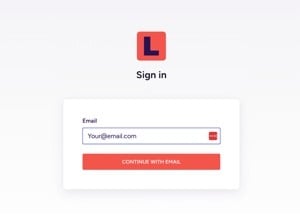
The sign in screen asks only for your email address.
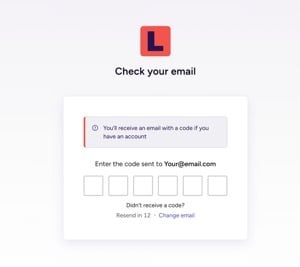
Enter the six digits from your email into the boxes on this screen.
A code can only be used once. If you mistyped your address, click Change email to go back and correct it. If the code has not arrived, wait for the short countdown to finish and you will be able to request another one.
Stay Signed In
Once you have signed in, you stay signed in for well over 24 hours, and that period starts again every time you use Lentune. In practice this means that if you are in Lentune regularly, you will very rarely be asked for a code at all. If you only use Lentune occasionally, for example to approve invoices once a month, expect a code most times you sign in. That is normal and does not mean anything is wrong.
Staying signed in works separately on each device. If you use Lentune on both a computer and a phone, you will enter a code on each of them the first time, and each device then keeps its own record of being signed in. So your phone may ask for a fresh code even though your computer has not. You will also be asked for a new code on a new device or browser, in a private or incognito window, or after you clear your browser history and cookies.
If Your Code Does Not Arrive
Codes normally arrive in under a minute. If yours has not appeared, work through these in order.
- Check your junk or spam folder. This is by far the most common reason.
- Check the address on screen. The Check your email screen shows the address the code was sent to. If it is wrong, click Change email and try again.
- Wait for the countdown to finish and request one more code, rather than requesting several in quick succession.
- Ask your IT team whether the message has been quarantined. If your business filters incoming email, they may need to allow messages from no-reply@lentune.com.
- Ask your Lentune administrator to confirm the email address held on your user record.
Why there is no error message. The sign in screen tells you that you will receive a code if you have an account, and it shows that same message whether or not your address is recognised. This is deliberate, so that nobody can use the sign in page to work out which email addresses exist. It does mean that if your address is missing or mistyped on your Lentune user record, you will see the normal screen and the code will simply never arrive. If you are confident you typed your address correctly, ask your administrator to check your user record.
If you are still stuck, email support@lentune.com or give us a call and we will help.
Keep Your Code Safe
A code is only ever valid for the person who asked for it, so please treat it like you would a password. Never share a code with anyone, including a colleague, your manager, or someone who says they are from Lentune. Nobody from Lentune will ever contact you and ask you to read a code out. If that happens, it is not us, and you should end the call and let your administrator know.
A genuine code only ever arrives immediately after you have tried to sign in. If a code turns up when you were not signing in, someone else may be attempting to use your email address. Do not enter it, and please tell us at support@lentune.com so we can look into it.
FAQ
Q: Do I still need a password?
A: No. Passwords have been removed entirely. Your email address and the six-digit code are all you need.
Q: I entered my email address, but no code arrived and there was no error message. Why?
A: The screen deliberately looks the same whether or not your address is recognised, so that nobody can use it to discover which email addresses exist. If you are sure you typed your address correctly, the most likely cause is that a different address, or no address, is held on your Lentune user record. Ask your administrator to check.
Q: How long is a code valid for?
A: A code is valid for a short period only, and can be used once. If it expires, request a new one once the countdown on screen has finished. [EXACT VALIDITY PERIOD — TO BE CONFIRMED]
Q: Do I need my email open on the same device I am signing in on?
A: No. You just need to be able to read the code, whether that is on the same computer, your phone, or anywhere else. Many people sign in on a computer and read the code on their phone.
Q: Why am I being asked for a code again when I signed in recently?
A: Most often because you are on a different device or browser than last time, because you are using a private browsing window, or because your browser cookies have been cleared. It can also happen if you have not used Lentune on that particular device for a while.
Q: Can I use Lentune on my computer and my phone?
A: Yes. Each device signs in separately, so you will enter a code on each one the first time. After that they are independent, and one may ask for a code when the other does not.
Q: Somebody phoned and asked me to read out my code. Was that Lentune?
A: No. We will never ask you for a code. Please end the call, do not share the code, and let your administrator know. You can also report it to us at support@lentune.com.
Q: My email address has changed. What should I do?
A: Ask your Lentune administrator to update the email address on your user record. Your next code will then be sent to the new address.
Q: Does this change what I can see or do in Lentune?
A: No. Your permissions, access and data are unchanged. This affects only the way you sign in.
Q: I use Lentune for more than one business. How does that work?
A: You sign in to each Lentune site separately, using the same email address. If you have any difficulty moving between sites, please contact us at support@lentune.com.
If you look after Lentune users for your business, see Prepare Your Users for One-Time Code Sign-In.
Need more help? We’re here! We hope our article was helpful. If you need more info or want to connect, drop us an email at support@lentune.com.